ColorPicky — The Rust Real-Life Color Picker
A real-time color picking tool powered by Rust and Embassy for the RP2350.
Author: Razvan Andrei Timofte
GitHub Project Link: https://github.com/UPB-PMRust-Students/project-dm-2025-razandtim
Description
ColorPicky is a compact, real-time color picking tool built in Rust using Embassy on the RP2350 (Raspberry Pi Pico 2W). It reads colors from real-world objects using a TCS34725 sensor, identifies them by name and hex code, and keeps a history of your findings. Features include:
- Real-time Color Sensing: Reads RGB and Clear channel data from a TCS34725 sensor
- Color Naming: Matches the sampled color to the nearest known color name (e.g., "Red", "Sky Blue", "Forest Green")
- Hex & RGB Display: Shows the precise Hex code and RGB values on screen
- History Mode: Stores the last 10 saved colors in a scrollable history list
- Interactive UI: Main screen with live color preview and History screen for saved colors
- Button Controls: Hold for live sampling, tap to save, double tap to switch screens, long press to clear history
Motivation
This project was inspired by practical use-cases in graphic design, photo/video color grading, and UI branding, where it is useful to capture and reuse colors from physical objects. The second goal was to gain hands-on experience with embedded Rust on RP2350 using Embassy, integrating multiple peripherals (I2C + SPI + GPIO) in a responsive application.
Architecture
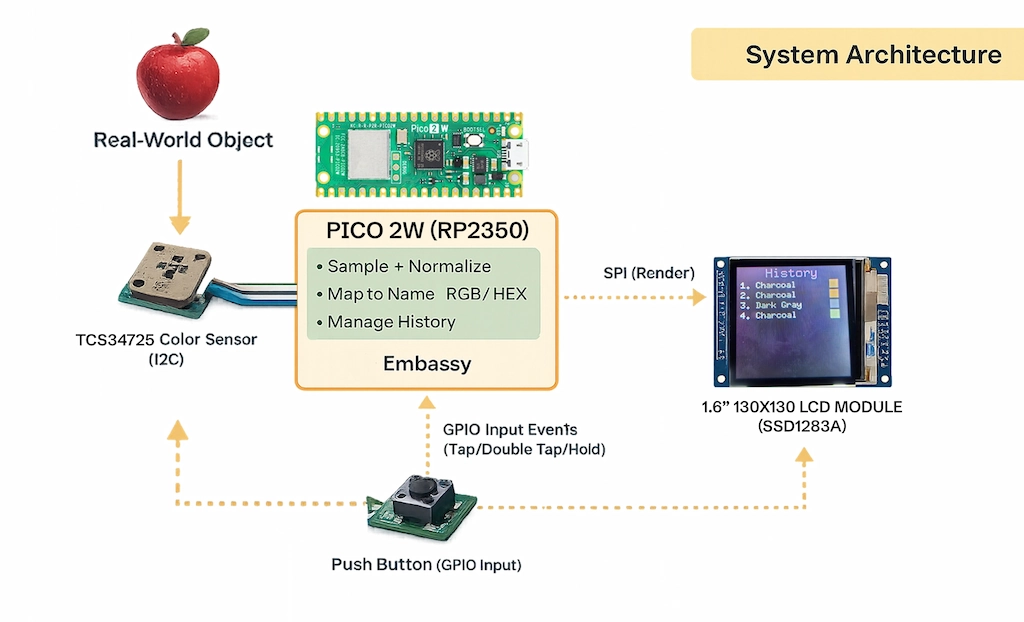
The firmware is organized around three main components:
-
Sensor Module: Handles periodic I2C communication with the TCS34725 color sensor, reading RGBC values and converting them to standard RGB/HEX formats with nearest-match color naming.
-
UI/Display Module: Manages SPI communication with the SSD1283A LCD and uses
embedded-graphicsto render two screens:- Main Screen: Live color preview box, color name, and hex code
- History Screen: Scrollable list of previously saved colors
-
Input Handler: Monitors the GPIO button and interprets gestures (tap, double tap, hold, long press) to control application behavior.
All components share an Application State containing the current sampled color and a ring-buffer history of saved colors.
Log
Week – 18-26 November
Ordered and received hardware parts (Pico 2W, TCS34725). Prepared breadboard wiring and verified power rails.
Week – 29 December - 4 January
Verified peripherals individually:
- I2C communication with the TCS34725 (basic readout and sanity checks)
- SPI communication with the LCD (initialization + test drawing)
- GPIO button input (debounce and stable reads)
Set up Rust embedded environment and Embassy toolchain, configured the target, linker settings, and flashing workflow. Resolved early build/runtime issues on RP2350.
Week – 12-18 January
Implemented the main application logic:
- Continuous sampling
- RGB/HEX conversion
- Color naming (nearest-match approach)
- UI screens + history buffer
- Input gestures (tap/double tap/long press)
Integration + stability improvements:
- Refined UI layout
- Improved responsiveness
- Added photos and documentation (pinout, usage, future work)
Hardware
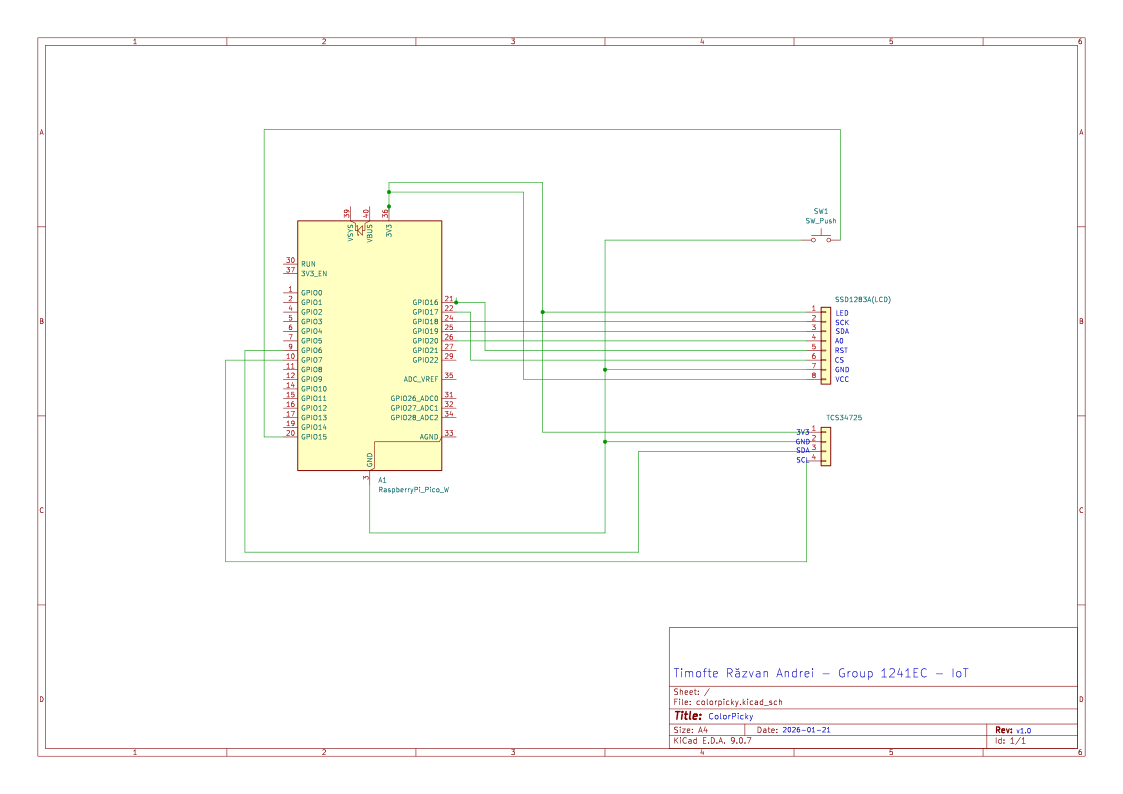
The project uses a Raspberry Pi Pico 2W as the main microcontroller, communicating with a TCS34725 RGB color sensor over I2C and an SSD1283A 1.6" LCD display over SPI. A push button connected to GPIO provides user input for controlling the application.
Schematics
Bill of Materials
| Device | Usage | Price |
|---|---|---|
| Raspberry Pi Pico 2W | The microcontroller | ~31 RON |
| TCS34725 RGB Color Sensor | Reads RGB and Clear channel data from objects | ~40 RON |
| SSD1283A 1.6" 130x130 SPI LCD | Display for UI and color preview | ~25 RON |
| Push Button | User input for controlling the application | 0.1 RON |
Software
| Library | Description | Usage |
|---|---|---|
| embassy-rp | Embassy HAL for RP2350 | Async runtime and peripheral access for Pico 2W |
| embassy-executor | Embassy async executor | Task scheduling and async/await support |
| embedded-graphics | 2D graphics library | Drawing UI elements, text, and color boxes to the display |
| defmt | Efficient embedded logging | High-performance debug logging via probe-rs |
Links
- Embassy - Rust Async Framework for Embedded
- TCS34725 Datasheet
- Embedded Graphics Documentation
- RP2350 Datasheet
- probe-rs - Embedded Debugging Toolkit
- Improve naming accuracy using perceptual distance (ex. CIE Lab / ΔE) and a larger palette
- Design a compact enclosure (3D printed casing)
- Add a web app