Rust Calculator
A calculator that take numbers and opperations as inputs and outputs results and can use wifi
Author: Scrob Sebastian-Mina
GitHub Project Link: https://github.com/UPB-PMRust-Students/project-Seby-S/tree/main
Description
This project implements a calculator using a Raspberry Pi Pico 2w microcontroller running rust code. It supports:
- Basic arithmetic: addition, subtraction, multiplication, division
- More advanced functions: exponentiation, square roots, and (in future iterations) trigonometric operations
- Wifi connectivity: ability to connect to a pc and recive input or sent an output
- Graphical interface: an LCD display(with blue backlight) for on device feedback
- Audible feedback: buzzer beeps confirm key presses
Input comes from a 4x4 matrix keypad and output is drawn via embedded-graphics primitives on the LCD and signaled through a buzzer.
Motivation
I wanted to make something practical for my project and I use calculators all the time in my student life. I also like simple user input/output devices.
Architecture

Components
- Raspberry Pi Pico 2w: connected to everything and runs code, has wifi functionality
- Keypad: connect with GPIO pins
- LCD display: connect with GPIO pins and uses I2C
- Buzzer: connect with GPIO pins
Log
Week 5 - 11 May
Parts have arived and got the bords to work.
Week 12 - 18 May
Schematics and wireing done. Now coding for the dispaly and keypad is in progress.
Week 19 - 25 May
Coding part has started.
Hardware
- Raspberry Pi Pico 2W (RP2350): Main microcontroller handling system logic, display and wifi functionality
- LCD 1602 I2C, blue backlight: 16x2 character display for UI and results
- Keypad: user input for numbers and operations
- 3V active buzzers: audio feedback for key presses
- Breadboard & jumper wires for prototyping
Schematics
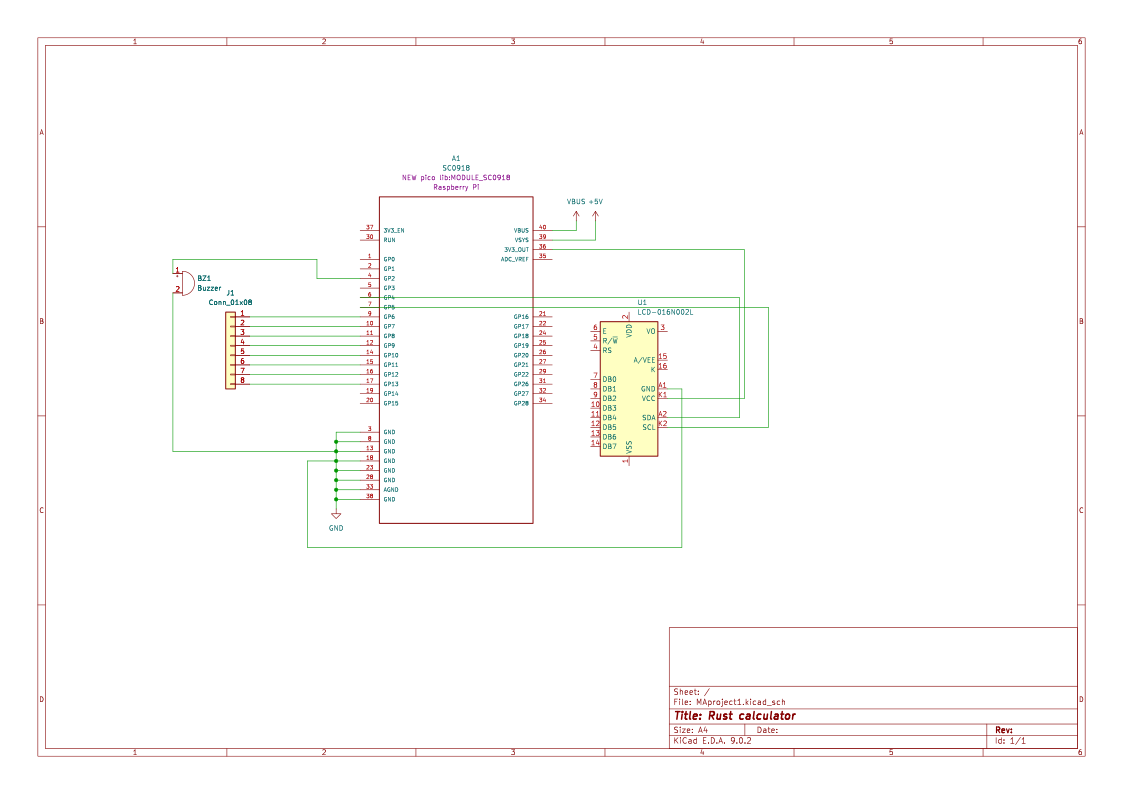
Bill of Materials
| Device | Usage | Price |
|---|---|---|
| Raspberry Pi Pico 2W | The microcontroller | 39 RON |
| LCD 1602 cu Interfata I2C si Backlight Albastru | output | 16 RON |
| Tastatura matriceala 4x4 | input | 7 RON |
| 2x Buzzer Activ de 3 V | audio feedback | 2 RON |
| Breadboard HQ (830) | platform | 10 RON |
| Set Fire | wires | 8 RON |
| Total: 82 RON |
Software
| Library | Description | Usage |
|---|---|---|
| embassy-rp | RP2040 peripheral access library | GPIO pins |
| [embassy-executor] | Async task executor | #[embassy_executor::main] entry point |
| embassy-time | Async timer utilities | Debounce delays and scan timing |
| defmt | Efficient logging framework for embedded | info!, warn!, error! |
| defmt-rtt | RTT transport layer for defmt logs | Sends log frames over SWD |
| panic-probe | Panic handler with probe support | Halts on panic, outputs location via RTT |
| heapless | Fixed-capacity data structures (no-std) | String<32> for input buffer |
| core (https://doc.rust-lang.org/core/) | Rust core library (no-std) | String manipulation, iterators, arithmetic |
| embedded-hal | Hardware abstraction traits | used by PCF8574 driver |
| ag_lcd | Generic LCD display driver | LcdDisplay over PCF8574 I/O expander |
| port-expander | Drivers for I²C I/O expanders | pcf8574::Pcf8574 implementation |