Music Player
A device that plays, stops and skips music.
Author: Dragan Delia-Alexa
GitHub Project Link: https://github.com/UPB-PMRust-Students/project-ddeliaffelia
Description
Simple, compact music player built using a Raspberry Pi Pico W, programmed in Rust. It will allow users to play, pause, and skip songs stored on an SD card through a speaker, whose volume can be controlled using a potentiometer. The LCD display is meant to show the playing song's title.
Motivation
I tried to find a project idea that fits my interests and that I could enjoy working on. I have been passionate about music since I was little, and I can still recall the day my parents bought me a music player just like my brother's. Besides, I find it quite fun to work on a hardware project like this one.
Architecture
Raspberry Pi Pico 2W:
- the centre of the project, controls all the other components
- connections: SPI - SD card module, ADC - potentiometer, PWM - buttons, amplifier, I2C - LCD
LCD:
- displays the name of the song
- connections: I2C - microcontroller
Amplifier:
- increases the quality and strength of the sound
- connections: through wires - speaker, PWM - microcontroller
Speaker:
- emmits the music
- connections: through wires - amplifier
Potentiometer:
- increases or decreases the volume
- connections: ADC - microcontroller
SD card module:
- supplements storage space for the songs that will be played
- connections: SPI - microcontroller

Log
Week 5 - 11 May
Week 12 - 18 May
Week 19 - 25 May
Hardware
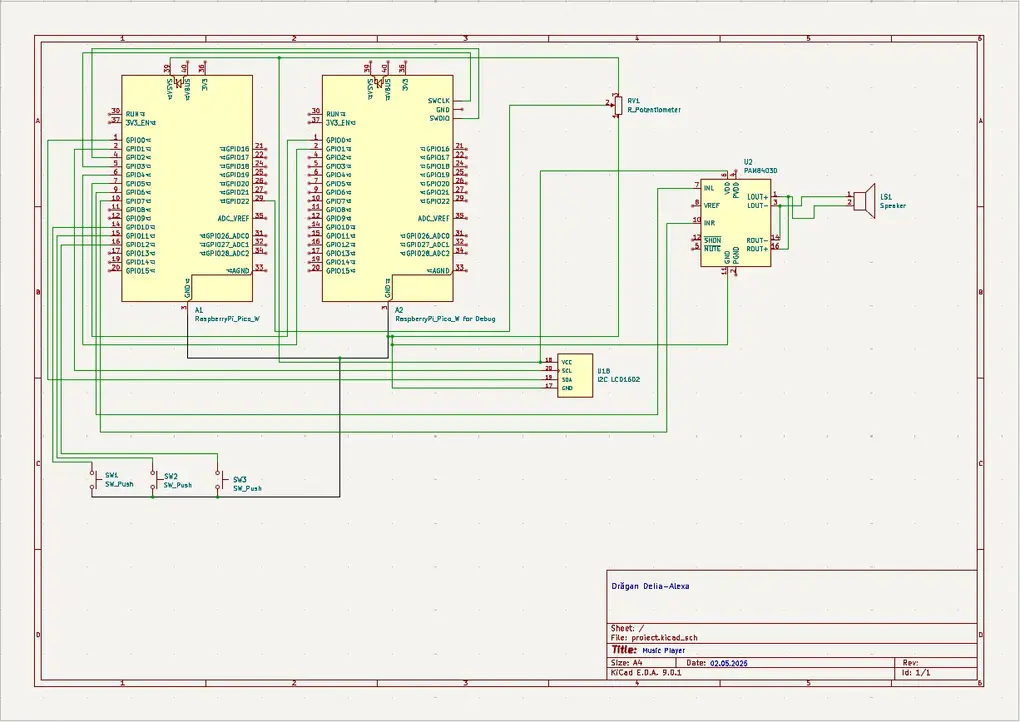
In this project, the core piece is a Raspberry Pi Pico 2W that gets its digital audio play-back from an SD card inserted in a module, interfaced via SPI protocol, and outputs it through a speaker, powered by a PAM8403D amplifier. A 1602 LCD displays via I2C protocol the currently playing song's title. The emmitted sound's volume is controlled by a manually adjustable variable resistor (potentiometer). There are also three buttons connected to the microcontroller's GPIO pins meant to play, pause and navigate through the songs.
Schematics
Bill of Materials
| Device | Usage | Price |
|---|---|---|
| Raspberry Pi Pico W | The microcontroller | 35 RON |
| Breadboard kit | Breadboard, resistors, cables, buttons | 71 RON |
| LCD Display | Displays song | 16 RON |
| Amplifier | Boosts audio | 4 RON |
| Speaker | Plays audio | 4 RON |
| Potentiometer | Changes the volume | 2 RON |
| SD Card Module | Reads SD card with songs | 6 RON |
Software
| Library | Description | Usage |
|---|---|---|
| embassy-rp | Embassy HAL for Raspberry Pi RP2040 | Used for running Rust on Raspberry Pi |
| embassy-executor | async/await executor | Used for asynchronous programming |
| defmt | Highly efficient logging framework | Used for debugging |
| cortex-m | Low-level access to Cortex-M processors | Used for accesing Cortex-M processor |
| lcd-lcm1602-i2c | Driver for LCD1602 | Used to control the display |