SchoolGate
An RFID-based gate system that controls school access, displays student info and logs entry time.
Author: Yelyzaveta Lysenko
GitHub Project Link: https://github.com/UPB-PMRust-Students/fils-project-2026-elysenkko
Description
My project simulates a school entrance control system. An LED array imitates a student walking toward the gate. When the student reaches the barrier and scans their RFID card, the STM32 checks if the ID is authorized — if yes, the servo opens and the OLED displays the student name and entry time. If the card is unknown, a buzzer beeps and the red LED turns on.
Motivation
I chose this project because access control systems are widely used in offices and schools, and I wanted to understand how they work from the hardware side. It also gave me the opportunity to work with multiple components and communication protocols simultaneously.
Architecture
- MFRC522 (RFID Reader) — Reads the student card ID via SPI and sends the data to the STM32.
- STM32 — Main controller that verifies the ID and coordinates all system outputs.
- Servo Motor SG90 — Actuator that opens the barrier via PWM when access is granted.
- OLED Display — Shows student name and entry time via the I2C interface.
- LED Array — Visual indicator that simulates student movement toward the gate.
- Buzzer + RGB LED — Feedback system: Buzzer and Red LED for "Access Denied", Green LED for "Access Granted".
Log
Week 4 – 7
Brainstormed project ideas and defined the concept of an RFID-based school access system. Researched required components and planned the overall architecture.
Week 7 – 9
Discussed the project with the lab assistant. Selected key components (RFID reader, servo motor, OLED display) and ordered all hardware components.
Week 9 – 13
Started implementation: connected and tested the MFRC522 RFID reader, implemented card detection and ID reading, set up communication between peripherals (SPI, I2C, GPIO), integrated the OLED display, tested servo control and calibrated motor positioning.
Hardware
- Microcontroller: STM32U545RE Nucleo (Core logic & ID verification)
- Input: MFRC522 RFID Reader (Reads student cards via SPI)
- Output: SG90 Servo Motor (Barrier control via PWM)
- Display: OLED Display (Shows student info via I2C)
- Feedback: Buzzer + RGB LED Common Cathode (Audio-visual status indicators)
- Visual Indicator: LED Array (Simulates movement toward the gate)
Schematics
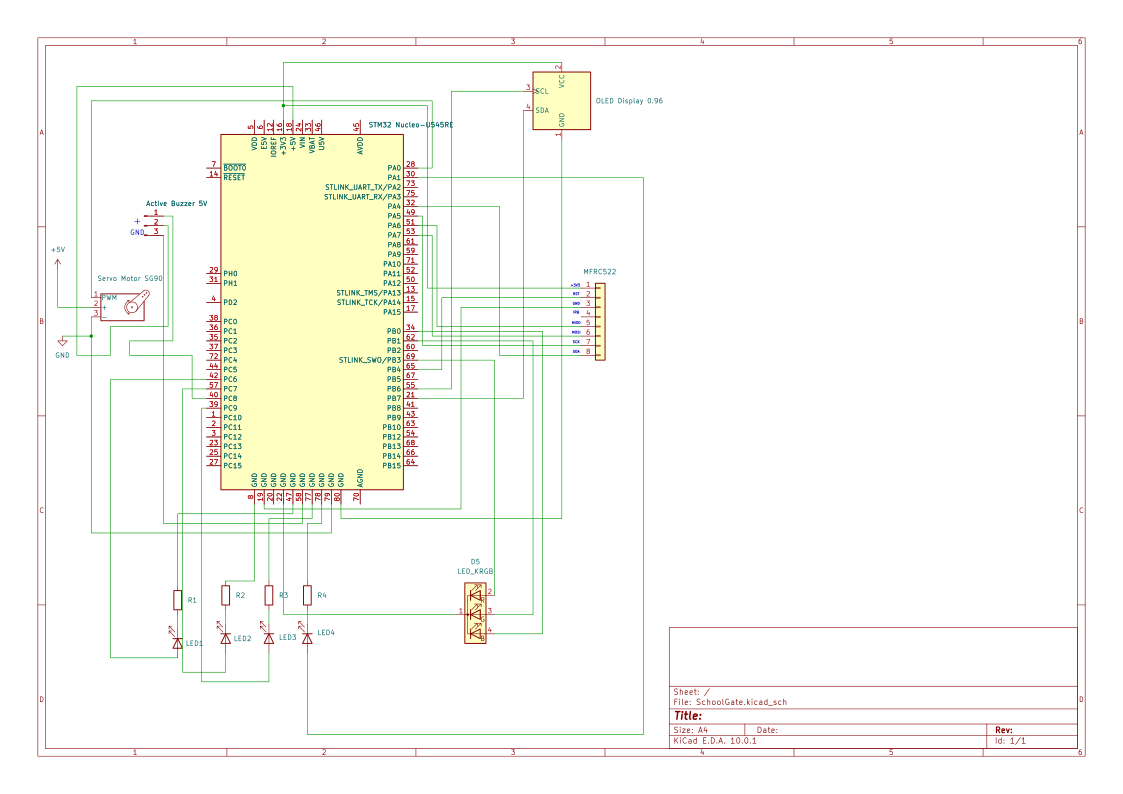
Bill of Materials
| Device | Usage | Price |
|---|---|---|
| STM32 Nucleo-U545RE | The central microcontroller used for core logic and ID verification | [Borrowed] |
| MFRC522 RFID Reader | Reads student card IDs via SPI and sends them to the STM32 | 18.98 RON |
| Servo Motor SG90 | Controls the physical barrier via PWM when access is granted | 9.99 RON |
| OLED Display 0.96" | Shows student name, current time, and entry count via I2C | 15.69 RON |
| RGB LED Common Cathode | Green/Red status indicator for access granted/denied | 1 RON |
| Active Buzzer 5V | Provides an auditory alert for denied access attempts | 3.24 RON |
| Breadboard 830p | Used for making physical circuit connections between components | 13.99 RON |
Software
| Library | Description | Usage |
|---|---|---|
| embassy-stm32 | Hardware Abstraction Layer for STM32 | Used for accessing SPI (RFID), I2C (OLED), and PWM (Servo). |
| embassy-executor | Async runtime for embedded systems | Used for managing concurrent tasks like scanning cards and moving the servo. |
| mfrc522 | RFID reader driver | Used for reading student card IDs via the MFRC522 module. |
| ssd1306 | OLED display driver | Used for controlling the 0.96" OLED screen to show student info. |
| embedded-graphics | 2D graphics library | Used for drawing text and status messages on the display. |
| defmt | Logging framework | Used for debugging and logging access events to the console. |
Links
- Korean School Access Systems Concept — Inspiration for the smart entrance security logic.
- Embassy-rs Documentation — The main guide for the async Rust framework you'll use for STM32.
- MFRC522 RFID with Rust Tutorial — Documentation for the RFID driver to read student cards.
- Embedded Graphics Simulator — A great tool to test your OLED UI (student names/time) before uploading to the hardware.
- STM32 PWM with Embassy — Examples on how to control the SG90 servo motor for the barrier.