RustRover
A Wi-Fi remote controlled Rover that collects, analyzes and stores samples.
Author: Ciocan George-Sebastian
GitHub Project Link: https://github.com/UPB-PMRust-Students/fils-project-2026-Shushin1
Description
RustRover is a Wi-Fi remote controlled vehicle trying to mimic the functionality of an exploration rover like the ones used on Mars. It collects samples, analyzes and stores them. Also, the onboard sensors get information about the environment. It uses a camera for ease of navigation and for identifying the samples by reading a QR code. A front loader arm picks the object and puts it in the cargo bay. Once powered on, a webpage is started where the rover can be controlled and a display shows the user the IP address where to connect to.
Motivation
The motivation behind the project was my interests in aerospace and CAD modelling. A drone would've made more sense, but since I already had some of the components for building an RC car, I decided to make a Mars Rover. This way, I could make use of most of my parts, but also give it some personality through 3D printed parts and mechanisms designed by myself.
Design Concept
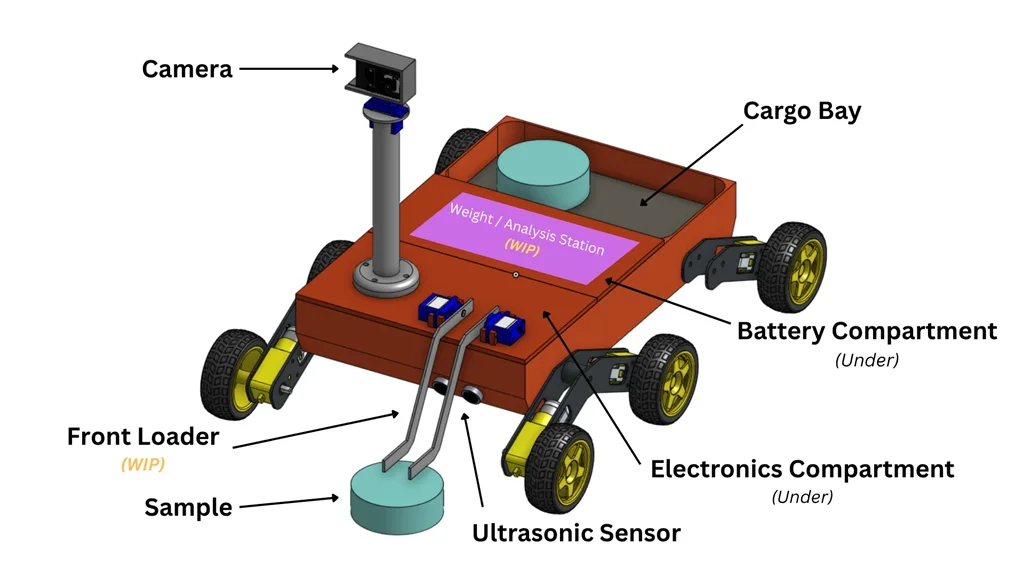
View the 3D model on Onshape: https://cad.onshape.com/documents/5f14d6b2b58ea1de1b963c7e/w/1fe714927cde1f63024d6414/e/a3d36fc78328462c12924175?renderMode=0&uiState=69cfa1ff11451da0736ff72f
Architecture
Log
Week 5 - 11 May
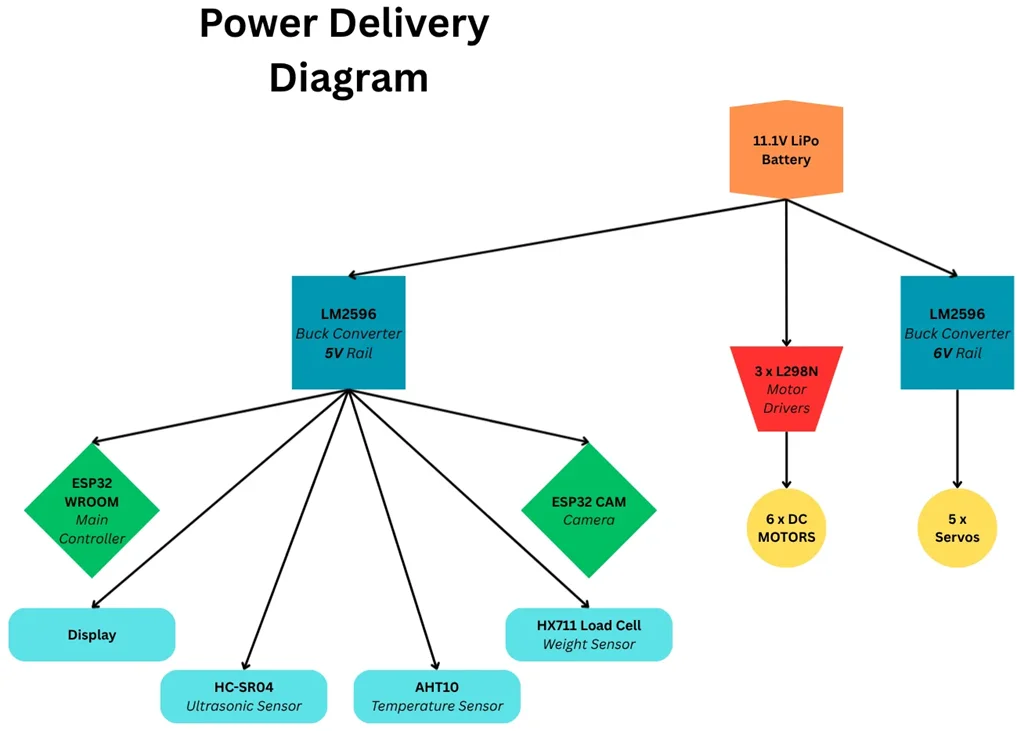
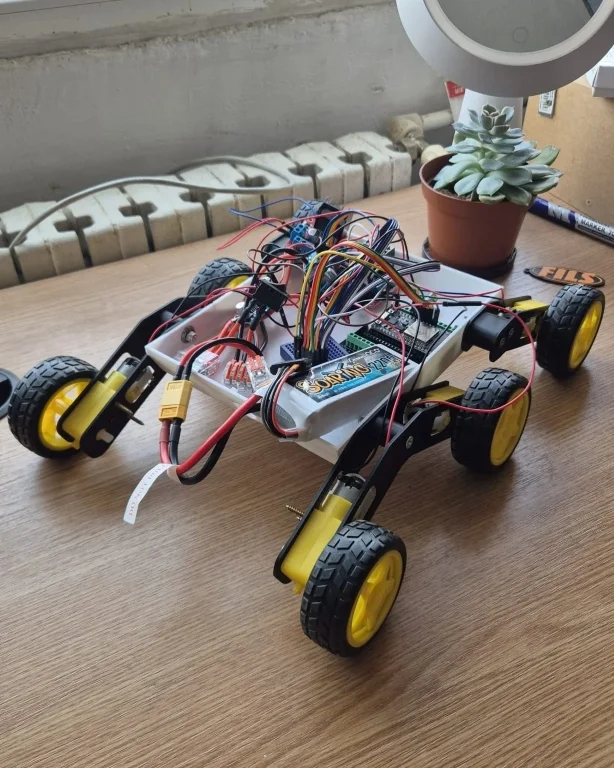
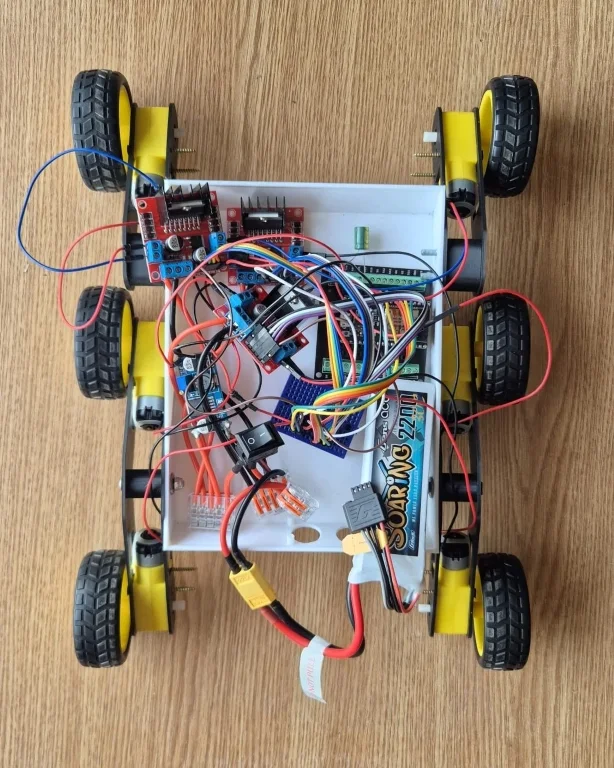
Got a first prototype working. The rover can be controlled with a smartphone, but no other peripherals are installed yet. For now, only the motor drivers and their motors are connected to the ESP32. Also, the power cables from the battery are connected to a master switch, after which they split in two power rails: 12V for the motors and a 5V from the buck converter for the ESP. The 6V converter will be connected later when adding the servos.
Week 12 - 18 May
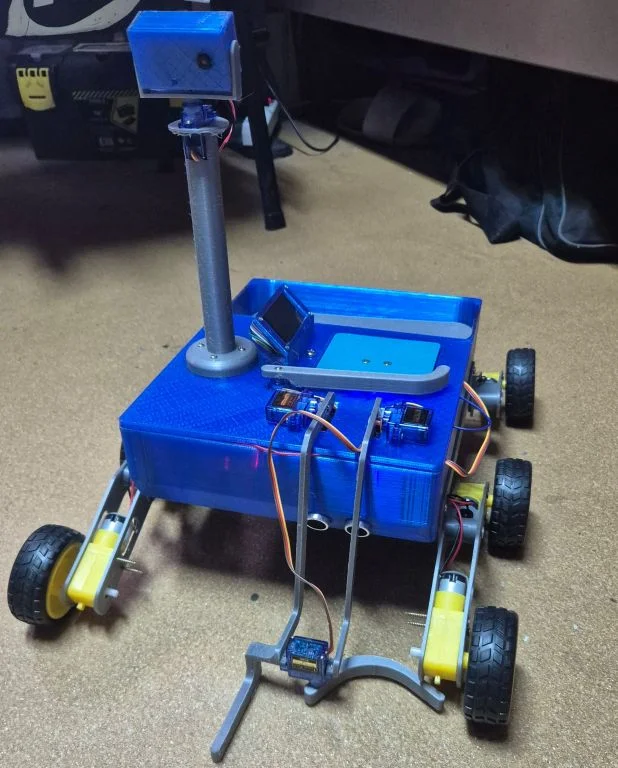
Printed the final design and installed all peripherals. They don't work together yet, but each was tested individually. The screen displays the information for the user to connect to the network.
Week 19 - 25 May
Did debugging, sensor calibration and tried to make everything work together. Not right there yet, cables are very crowded and it is hard to find which one disconnected.
Hardware
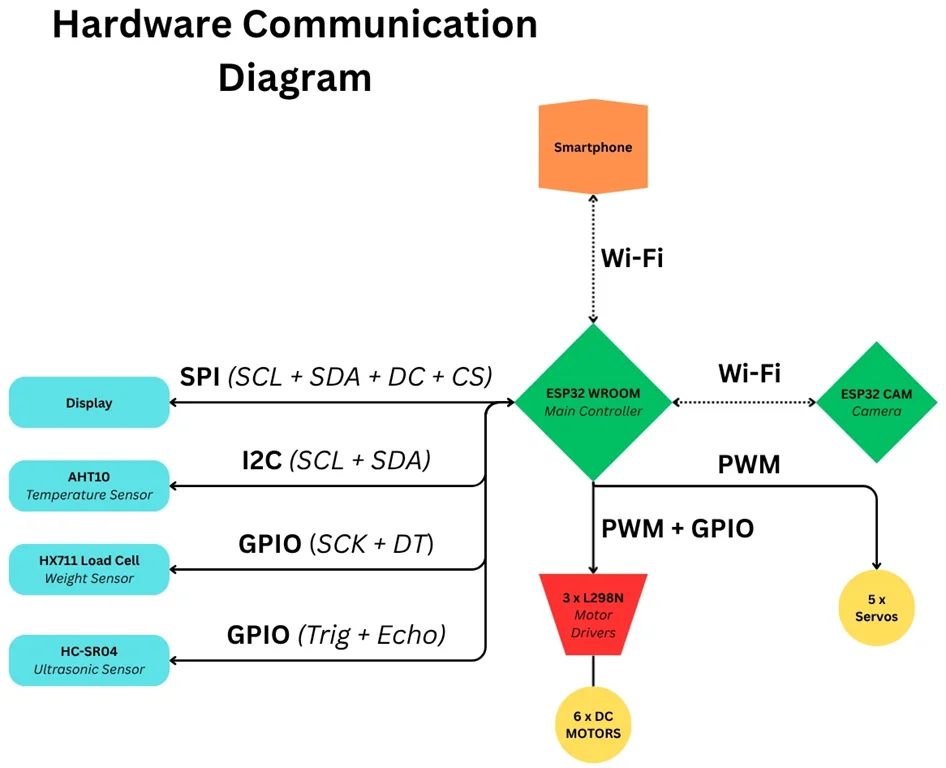
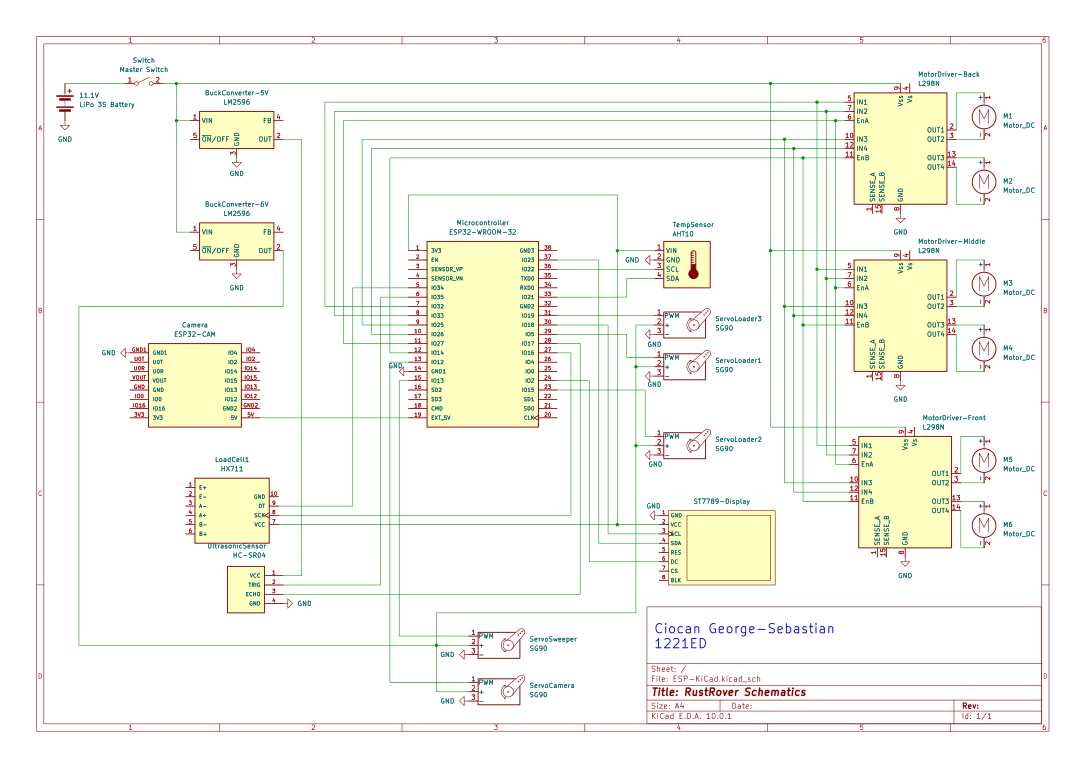
The main microcontroller, the ESP32 WROOM, creates its own Wi-Fi network to which the user connects with their phone. In browser, the user types the IP address shown on the display and a page with the camera view and rover controls appears. There are buttons to move the rover around and to rotate the camera. To pick up a sample, two conditions must be true at the same time: the ultrasonic sensor detects the sample in front of the rover and the camera scans the QR code on the sample to confirm its identity. If these are fulfilled, the loader arm descends, grabs the sample and throws it in the back of the rover, in the Weight/Analysis Station. Here, a pressure plate/weight sensor records the sample’s weight, saves it to a “database” and displays all the information about the sample on a display. After the sample is “analyzed”, a servo sweeps it in the cargo bay. And the cycle repeats. An additional temperature/humidity sensor on board might also provide information to be displayed/saved together with the sample measurements in the logs of the database.
Schematics
Bill of Materials
| Device | Usage | Price |
|---|---|---|
| 1 x ESP32 WROOM | Runs the Rust code, connects to Wi-Fi and manages all peripherals | 20.46 RON |
| 1 x ESP32 CAM | Incorporates the camera and runs C code to process the image | 35.14 RON |
| 5 x SG90 Servos | Used for moving the camera and the front loader | 25.54 RON |
| 6 x TT DC Motors + Wheels | Provide the traction for the rover | 43.44 RON |
| 3 x L298N Motor Drivers | Controls the motors | 30.48 RON |
| 1 x HC-SR04 Ultrasonic Sensor Device | Measures the distance from the rover to the sample | 6.64 RON |
| 1 x 1.9-inch ST7789 Display | Used for displaying sample info and the IP address where to connect the phone | 13.54 RON |
| 1 x HX711 Load Cell | Temperature sensor | 13.62 RON |
| 1 x AHT10 Sensor | Weight sensor | 7.99 RON |
| 1 x Passive Buzzer | Signals detection of the sample | 0.8 RON |
| LEDs | Used as headlights / indicators | 8.49 RON |
| 1 x 11.1V 3S LiPo Battery | Power source for all components | 94.99 RON |
| 1 x Rocker Switch | Master switch | 1.03 RON |
| Breadboard / PCB boards + Jumper Wires | Connect the components | 44.6 RON |
| 2 x LM2596 Buck Converters | Used for regulating the voltage; A 6V rail for the servos and a 3.3V / 5V for the microcontrollers | 11.06 RON |
| 3D printed parts | Chassis, Body, Front Loader, Motor Holders etc. | Priceless |
| Screws, Nuts, Bearings | For assembling the parts | 35.16 RON |
Software
| Library | Description | Usage |
|---|---|---|
| esp-hal | Hardware Abstraction Layer for ESP chips | Used to configure and control the ESP32's hardware peripherals |
| esp-alloc | Global allocator for ESP chips | Provides dynamic memory allocation |
| esp-backtrace | Exception and panic handler | Used for debugging |
| esp-println | Serial printing utility | Used to print debugging information to the serial terminal |
| embassy-executor | Async executor for embedded systems | Runs the background tasks concurrently |
| embassy-net | TCP/IP network stack | Used to create web sockets and run the HTTP web server |
| esp-radio | Wi-Fi driver | Used to host the Rover-AP acces point |
| edge-dhcp | DHCP server implementation | Automatically assigns IP addresses to devices that connect to the rover's Wi-Fi network. |
| embedded-graphics | 2D graphics library | Used for drawing to the display |
| mipidsi | Display driver | Manages SPI communication for the ST7789 display |
| embedded-hal | Hardware abstraction traits | Provides standard trait definitions |