Automated Coffee Maker
A machine for coffee
Author: Dumitrescu Teodora Cristina
GitHub Project Link: https://github.com/UPB-PMRust-Students/acs-project-2026-t3o27-1
Description
The project is an automated coffee machine that allows the user to choose exactly how much sugar and coffee they want. The process is simple: you turn on the device with a button, select your desired quantities from the menu, and then press a start button. The system then pours the sugar, coffee, and water in the correct order and mixes them together. The result is a finished coffee.
Motivation
I chose this project because I wanted to build something functional that I can actually use at home after the course is finished. I also find it very interesting to take a common object that you can normally buy in a store and try to recreate it from scratch.
Architecture
Input: Consists of push-buttons used to select the quantities of coffee and sugar, and an LCD display that provides feedback to the user. Additionally, the user must place the cup in the designated spot for the machine to start.
Processing: The STM32 Nucleo processes the signals from the buttons and coordinates the other components, managing the timing and quantities required for the recipe through the SG90 servo motors. It also verifies that the cup is properly placed with the help of the distance sensor and resets the system once the process is finished. With the help of the water pump and the mixer, the coffee is ready.

Log
Week 20 - 26 April
Preparing the project documentation and finalizing the structural layout. Purchasing the components.
Week 27 April - 3 May
Finishing the documentation and starting to experiment with the hardware components. Making the arhitectural scheme.
Week 4 - 10 May
Making some snippets of code separately for the components. Trying out different design ideas for the dispensers.
Week 11 - 17 May
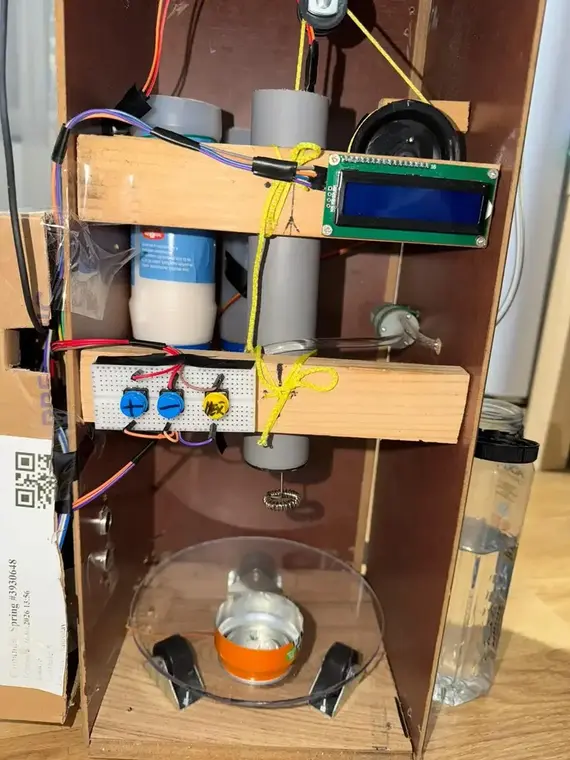
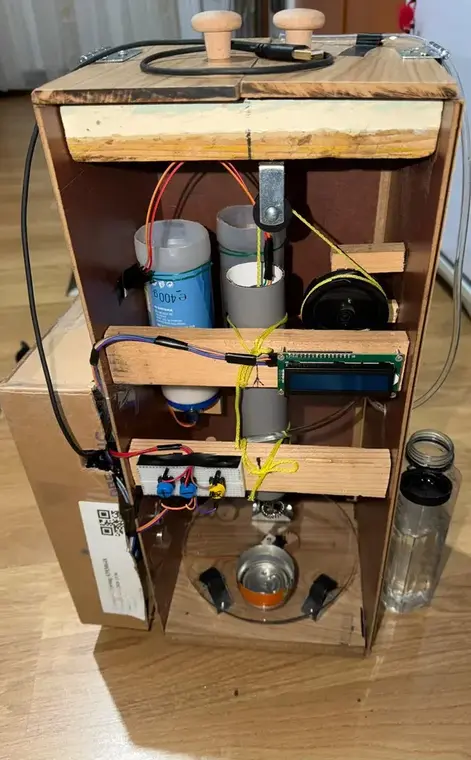
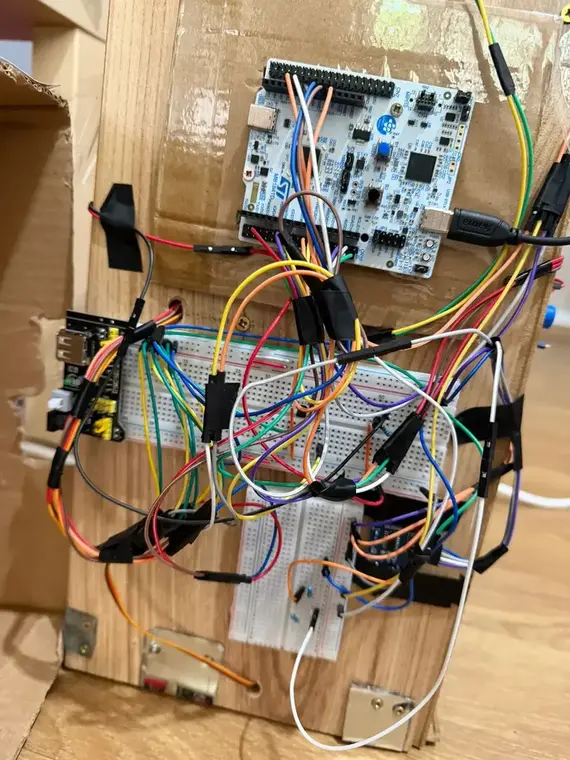
Assembled the box for the automate. Completed the wiring for the project. Testing the coffee quantities.
Week 18 - 23 May
Assembled the mixer and upgraded the box. Sorted the wires and incorporated the distance sensor. Improved the overall appearance of the box.
Hardware
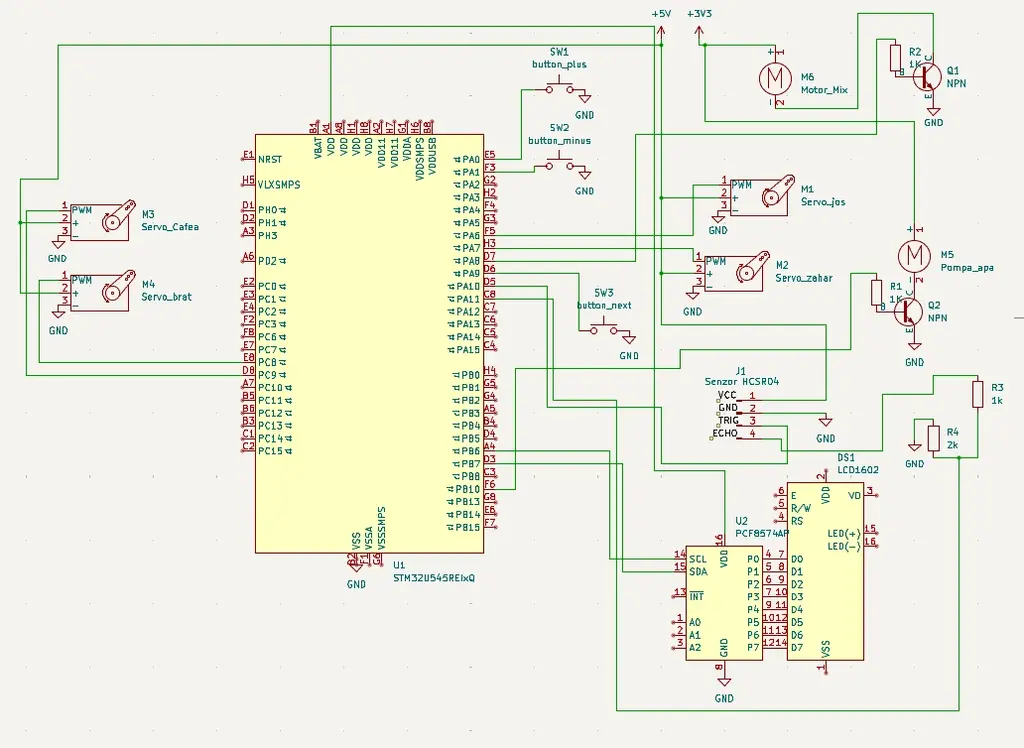
Major Components Used The servo motors: they disperse the quantities of sugar and coffee and also rotate the platform; also, one is helping the mixer move up and down.
The buttons: they help us select the quantities.
The LCD: it displays the feedback of the buttons.
The pump: it uses a transistor in order to function for an amount of time.
The mixer: it is a motor that mixes the ingredients in the final stage.
Schematics
Bill of Materials
| Device | Usage | Price |
|---|---|---|
| STM32 Nucleo-U545RE-Q | Main microcontroller | Provided by Lab |
| Servo SG90 (4 pieces) | Solid ingredients dispenser mechanism | 45 RON |
| LCD 1602 with I2C | User menu and status display | 23 RON |
| Tactile Buttons (3 pieces) | User input for quantity and start | 3 RON |
| DC Mixer Motor | Homogenizing the coffee (extracted from handheld mixer) | 18 RON |
| Water Pump 3.7V | Liquid dispensing | 20 RON |
| Water hose | The hose for the water pump | 12 RON |
| HC-SR04 Sensor | Detecting the cup | 18 RON |
| Plexiglas | Making the circle where the cup stays | 15 RON |
| Wire | Making the conexions | 20 RON |
| Charger 12V 2A | The power of the project | 18 RON |
| Pulley | For the movement of the mixer | 9 RON |
| Pulley wheel | For the movement of the mixer | 7 RON |
Software
| Library | Description | Usage |
|---|---|---|
| embassy-stm32 | Hardware abstraction layer for the microcontroller | The interface for GPIO, PWM, and I2C peripherals |
| embassy-executor | Task executor for async tasks | Managing parallel tasks for the pump, servos, and sensors |
| embassy-time | Time management library | Handling delays |
| defmt | Efficient logging framework | Used for printing status |
| panic-probe | Panic handler | Used for handling errors |

The code is structured as a state machine, where every action is executed one at a time following the diagram flow. After finishing the coffee, the user can clean the mixer by putting in a new cup and waiting for the machine to pour clean water.
For the part where the user needs to put or get the cup, the code waits while measuring the distance to the cup to see if it is present or not.
User interaction is handled through the buttons and the LCD. The user selects the desired quantity using the buttons, and the LCD provides immediate visual feedback. Also the LCD shows the progress of the preparation.
For the display, the LCD uses an I2C converter in order to communicate with the board. The code sends commands to set the cursor position, and then sends the ASCII number of the character in 2 different signals in order to put the letter on the screen.
Links
...